Typescript is a new standard in the Javascript world, and almost all tools and frameworks can deal with it now, but despite that, it’s also true that the existence of transpile step complicates development and hides actual code in a “black box”. In this post, we’ll see how we can write plain javascript code yet use typescript for type checks.
What is JSDoc
JsDoc is a tool that can generate API documentation from comments that formatted in a specific way, for example:
/**
 * Multiply two numbers
 *
 * @param {number} a - First number
 * @param {number} b - Second number
 *
 * @returns {number}
 */
function multiply(a, b) {
	return a * b;
}
In this example, we have documented a function and its parameters, as well as function and parameters’ types.
Beside simple cases, we can define array types, objects, type unions, export types from other files and packages, and all of that is done inside comment blocks. Following are examples of some JsDoc comments.
General syntax, parameters and return types
A Jsdoc command starts with the /** multi-line comment. Note that comments that don’t start with /** are not treated as JsDoc comments - /*** and /* comments won’t be parsed. Then documentation text goes. When we want to document parameters, we use @param tag:
@param {string} userName User name
@param tag has “{type} parameterName parameterDescription” form. To document return type, @returns tag is used:
@returns {number}
Optional parameters
We can make a parameter optional by wrapping it in square brackets:
/**
 * @param {string} [name]
 */
function printName(name="Name") {
	console.log(name);
}
Any type
/**
 * @param {*} value
 */
Default values
/**
 * @param {string} [somebody=John Doe] - Somebody's name.
 */
Union types
Here, the id parameter may be string or number:
/**
 * Get user by id
 * @param {string | number} id User id
 */
function getUser(id) {
	//...
}
Arrays
/**
 * @param {number[]} keys - List of keys
 */
Complex types
We can define our own types with @typedef tag:
/**
 * @typedef {Object} User
 * @property {number} id - User's id
 * @property {string} name - User name
 * @property {string} email - User's email
 */

 /**
  * Get user's info
  *
  * @param {number} id User id
  * @returns {User}
  */
function getUser(id) {
    //...
}
As you can see, we can declare a type with the @typedef tag and then use it as if it’s a normal type.
Import type from another file
It’s often needed to use a type declared in another file. Taking our previous example, we may want to create a userHelper file, which will contain helper functions that use the User type. Re-defining the User type is a nonsense. Luckily, we can import a type that was defined in another file:
/**
 * Returns user's age
 *
 * @param {import ('./user.js').User} user
 * @returns {number}
 */
function getAge(user) {
    //...
}
Variable typing
Sometimes we may want to set a type for a variable. In JsDoc, @type tag is used for this purpose:
/**
 * @type {import ('./user.js').User}
 */
const user = {
    name: "John Doe",
    email: "j.doe@email.com"
}
Now typescript will process the object behind the user variable as a User type that was defined in the user.js file.
Import type from an other package
We can import types from modules as well:
@returns {import("node:child_process").SpawnSyncReturns<Buffer | string | undefined>}
Add typescript
To take an advantage of typescript with JsDoc, we need two things:
- Add typescript support to our project
- Add
// @ts-checkcomment to the beginning of file
Now, when we run tsc --noEmit command, typescript will check types correctness in all files that have the @ts-check directive.
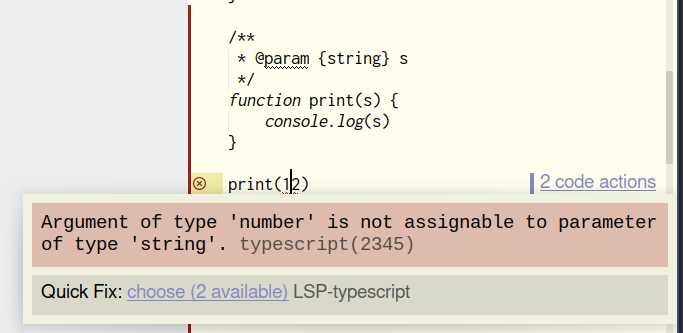
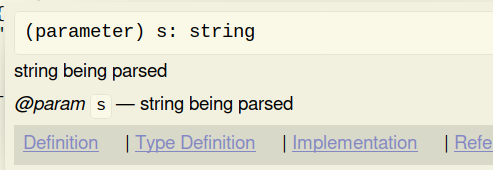
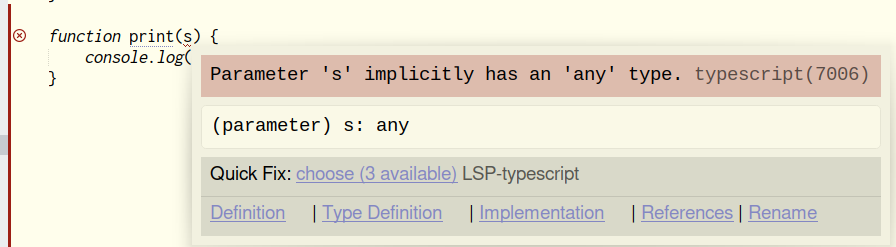
LSP works fine with this approach, too - you can enjoy hints, autocomplete, error messages and documentation popups right in your text editor (below are screens of Sublime Text with the LSP plugin in action):
JsDoc popup:
Implict Any type warning:
Wrong type error: